Vibe Coding a Solar Power Manager
Since we had our solar panels and backup battery installed like a year ago, I've been somewhat obsessed with eking out as much efficiency from the system as possible. This meant that I'd be constantly monitoring the weather (for cloud cover), battery levels, solar panel output (and snow coverage) and the power consumption of the house. While I actually do enjoy paying attention to all of these things, it's also something that takes up a lot of time and effort. Since I've been trying to automate anything and everything that I otherwise do manually, I thought I'd take on the challenge of setting up a solar power manager for my house.
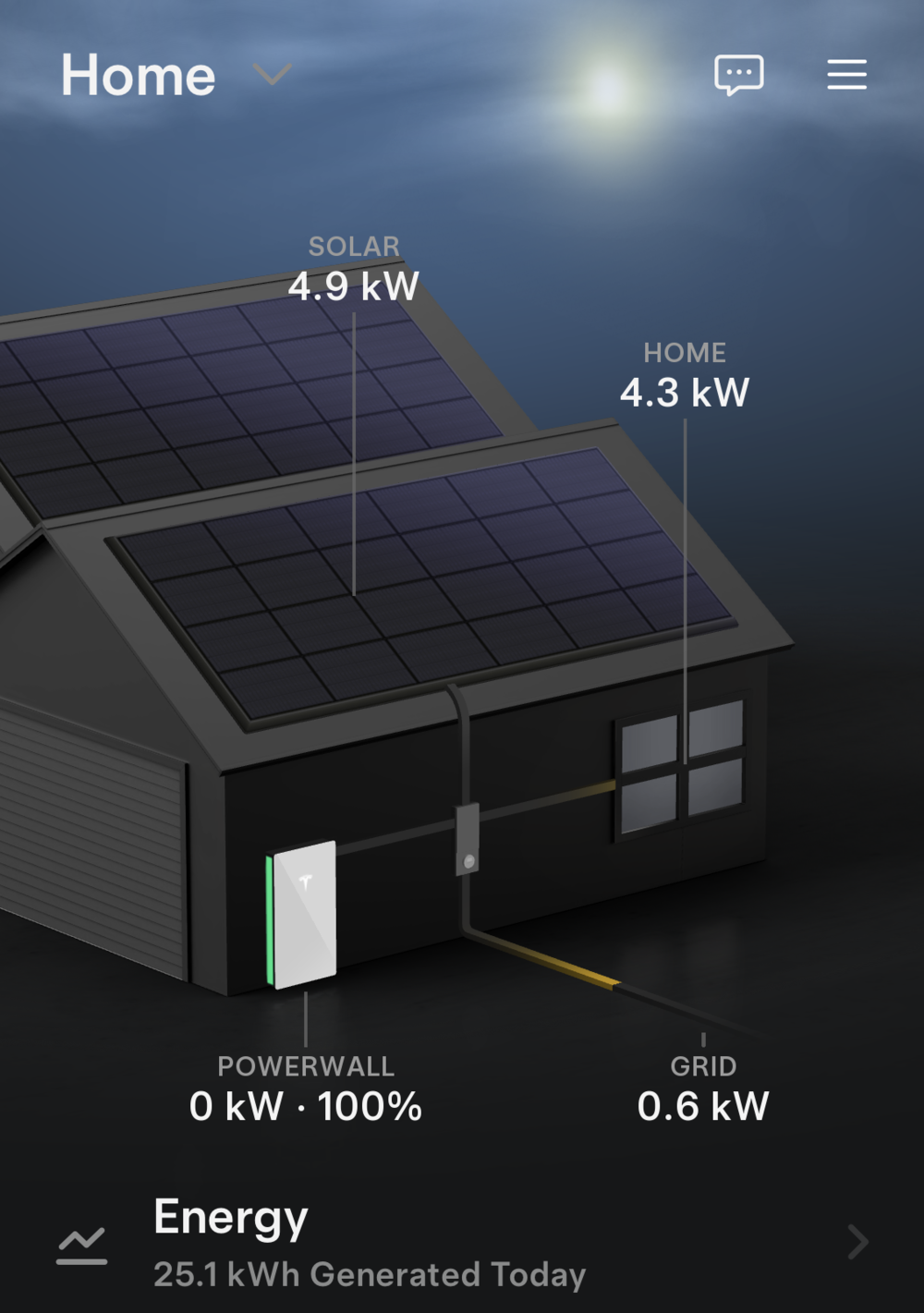
My Manual Process
I alluded to my obsession over the solar system of the house, but it'll probably help to explain exactly what I've been doing for a year now.
We're on a time of use program with DTE Energy, which means that the price of electricity changes based on the day and time. At times of higher demand, we buy and sell electricity at a higher price than at, say, 2 AM. This is relevant because we have a battery, so we can do things like buy a bunch of electricity when it's cheap and store it until we want to use it during the day when it would be more expensive to pull from the grid.
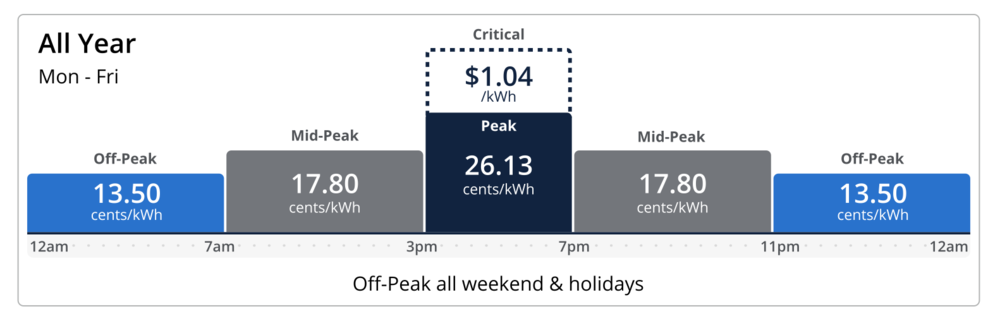
The chart above is actually a bit simplified and doesn't include the price that DTE pays for electricity when I sell it back to them. It also doesn't include the fees that they charge to deliver the electricity. Since I'm not on net metering, I sell electricity back at a lower cost than what it costs to buy it during any given period. I figured out the actual prices below.
| Time of Use Period | Buy Price ($/kWh) | Sell Price ($/kWh) |
|---|---|---|
| Off-Peak | $0.1540 | $0.04840 |
| Mid-Peak | $0.1978 | $0.09146 |
| Peak | $0.2719 | $0.17472 |
It basically costs 10 cents less for me to sell electricity than it does for DTE to sell it to me. The interesting thing is that I can still make a "profit" by filling up my battery during off-peak and selling it back to DTE during peak, though it isn't by much. I also think that this is technically not allowed because my Powerwall will never send more energy to the grid than what my solar panels are producing. So technically I only ever sell "solar" energy back.
My Tesla Powerwall holds 13.5 kWh of energy. On days when the sun is out and the panels are making a lot of energy, I want my batteries to be low in the morning so I can charge them with solar and use that energy later (because selling it to DTE is a losing proposition unless we're in the peak period). If we're not going to get a lot of solar power, then I want my battery to be fully charged in the morning so I can use the cheap energy during the day from the Powerwall and not buy it for $0.27 a kWh.
So basically I've been managing the solar power system by adjusting how much the battery should charge by guessing how much energy we'll get the next day. I mostly just do it by vibes, which coincidentally is also how I coded the solar power manager that will hopefully replace me! There are also other somewhat complicated things I do. For example, since the battery only holds 13.5 kWh, I could set the battery to 0 in the morning and it could charge all the way up to 100% before 3 PM on a sunny day. That would mean that I'd be selling my solar energy at around 9 cents per kWh, when I could be using it for other things. I calculate that opportunity cost at around 6 cents. If that's the case then I'll probably start charging my electric car. In my head I'm charging it for 9 cents instead of 15 cents during off-peak. Like I said, I'm kind of obsessed with efficiency.
The tl;dr version of this is basically this:
- Ensure I don't pay more than I need to for electricity.
- Ensure I get paid the maximum amount for selling electricity back to DTE.
- Ensure I'm as efficient as possible with the solar power that I generate.
After writing all of this out I'm surprised I didn't try to automate this sooner. I should also note that the Tesla Powerwall has a "Time Based Mode" that is supposed to handle some of this logic, but it kind of sucks so I don't trust it to do a good job.
Setting up Solcast
In addition to checking the weather forecast, I also tried using an integration in Home Assistant from Forecast Solar that would... forecast my solar production. I may have done a bad job at setting it up though, because it was wildly inaccurate. Sometimes it would predict more solar output than my panels were capable of.
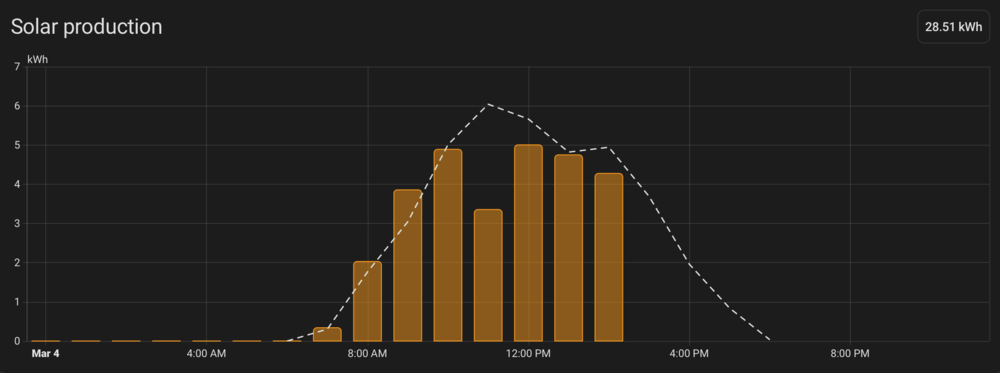
I recently signed up for an account with Solcast. This provided a much more accurate estimate of my solar output, which I've been using with both Home Assistant and my automated system which I'll describe below.
Enter the Automated Solar Power Manager
I started vibe coding a solar power dashboard maybe a month ago. It was supposed to give me more visibility into my system, and also eventually manage the system myself. I got a sorta cool looking dashboard setup and then promptly got bored of it. While I was playing around with OpenClaw, I realized how much I'm constantly fiddling with my solar setup, so I thought I would try automating that.
While I like LLMs and I think they can be useful for a lot of things, there's also a lot of things they'd be overkill for. I used an LLM to help me code this thing up, but it's strictly a program that simulates the estimated solar power that will be generated and then acts on that simulation in a deterministic manner. I don't need any non-determinism fucking things up here!
My goal was pretty much to write a script that would do exactly what I would do, if I had infinite time to sit and stare at my phone every few minutes to manage what my solar system would do next, even in the middle of the night (I wasn't that obsessed yet). I had some long conversations with the coding agent (I used Claude Opus 4.6 in Google Antigravity to do the initial planning and Gemini to code most of it up) about all of the ways I micromanage the system. I had to do a couple of iterations of this, because the script really needed to encapsulate all of the OCD that I have for every single aspect of efficiency for this project.
For example, the script was setting the battery to 0% in the morning if the sun was going to be especially powerful. But at 7 AM the sun might not be out enough to power the house completely, so I'd be wasting money on mid peak prices until the sun caught up with the house's energy usage. So I had the AI reserve some power to get through that period of time.
Since I keep all things related to my home set up in Home Assistant, I basically just had the AI look at all of my Home Assistant entities and then use the HA API to do things like change the battery reserve value and fetch the solar forecast data, along with the energy usage of my house and the output of my solar panels. It works really well since the script runs on the same machine as Home Assistant.
One fun part of building this script was that I had the AI write failing tests before fixing any cases that I wanted it to add. I honestly never liked writing tests and still don't, but if an AI does it then that's fine with me. The test cases were all situations that I told the AI to handle beforehand anyway, like "at 11 PM we should start charging for tomorrow, but maybe not to 100% because it's bad for the battery to stay at 100% for too long, so just do it to 80% and then wait until like 5 AM to increase it to 100%." It's sort of like one part user requirements and one part unit test in one.
I also added a few features that I've wanted for a while but would be too insane for me to do manually. For example, if the battery needs to be low in the morning (to account for a high solar day), I would normally set the battery reserve to something like 10%. The battery would remain at 10% all night until 7 AM, then it would start discharging. But what if the power went out at 3 AM? I'd prefer to keep a reserve of battery just high enough to last me until the morning when the sun (hopefully) would come up. So I had the AI set up a system where we fill the battery and then use it over the night so that it would eventually land at 10% (or whatever the calculated value should be) at the right time. This would protect us from a late night or early morning power outage and have the same effect as leaving it at 10%. Minus round trip efficiency and battery cycles, I guess. If this ends up not being useful I could also just remove it as a feature.
For now, I'm running this Python script as a system service that runs every 15 minutes. There's no reason it couldn't run more often but I figure running it every minute would be overkill and 15 minutes seems more reasonable.
I'm hoping that this automated solar manager will reduce or eliminate the amount of time I spend trying to optimize my energy usage. I don't quite trust it 100% yet, since I haven't really run it for very long yet.
As I'm writing more of these lil' apps for myself with AI coding agents, it's really dawning on me how useful it is to be able to quickly create a bespoke app just for myself. I've always made apps for myself, but they haven't always been this fully featured or easy to produce. This isn't something that I'd try to sell to other people, because it's basically fitted to me and only me. I'm sure there are other people out there who are just as obsessed with their solar efficiency, but they can vibe code their own damn code.


Leave a Comment
Comments are moderated and won't appear immediately after submission.