-
June 12, 2014
Android Wear Design Contest!
Last week I went to a GDG Ann Arbor Android meetup on Android Wear. The presentation was set up by Google and had a bunch of information on the upcoming Android Wear SDK. At the end, it was announced that there would be a few vouchers for Android Wear devices available. A design contest was announced and the deadline was set at Sunday.
Being naturally competitive and really into new technology, I made a design mockup for a home automation app that I thought would be useful to have on a wearable device (the most common form factor happens to be a watch). Here’s my submission that I originally posted to Google Plus:
More … -
May 22, 2014
Inspecting and Debugging API Versions with Runscope
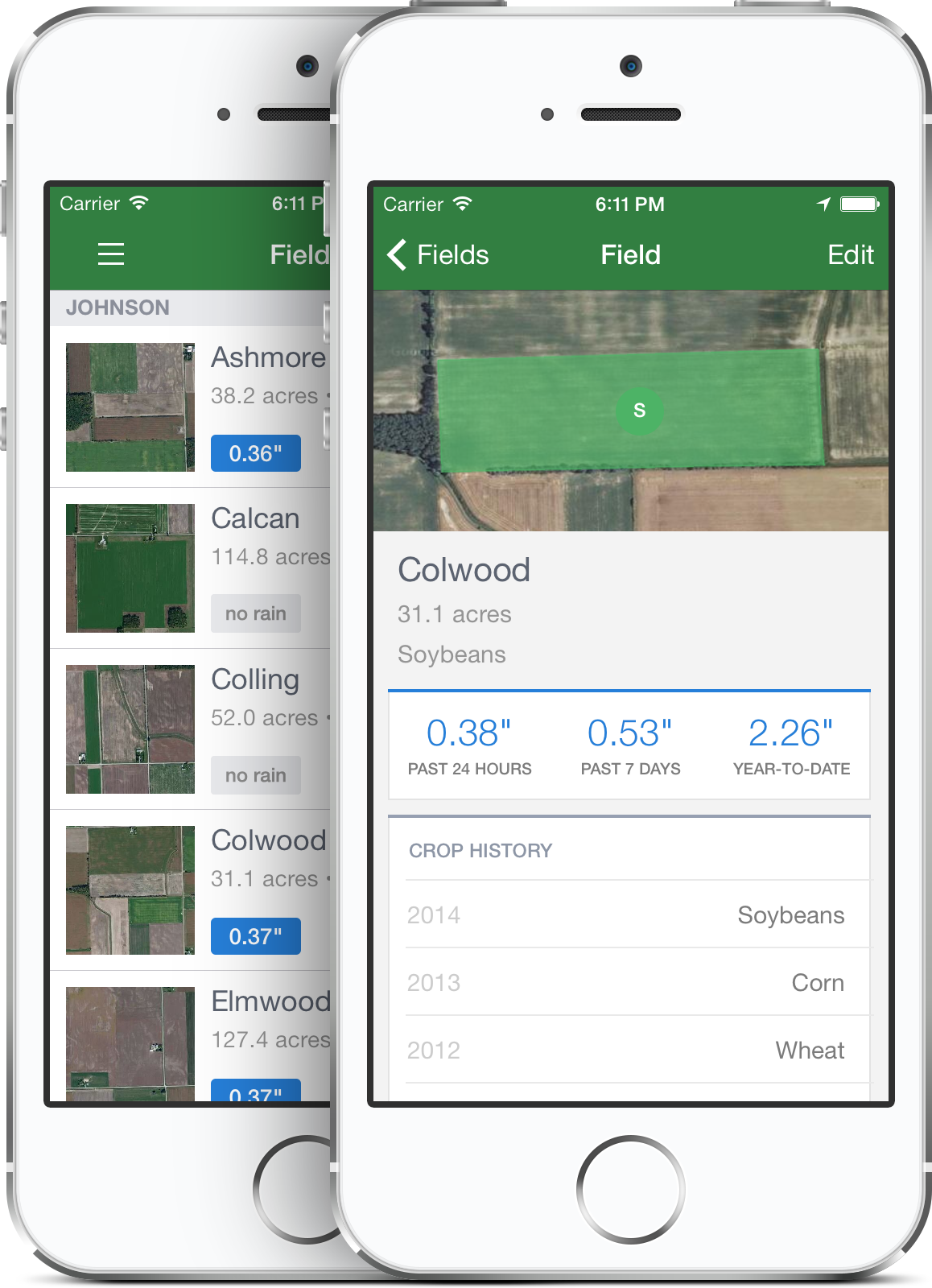 This past month at FarmLogs, we implemented a versioning scheme for our internal API. API versioning is often a difficult transition to make, especially if you’re using a third party API and dealing with deprecations (Facebook, I’m looking at you!). It’s often a chore to figure out exactly what has changed between API versions unless you have very good documentation.
Coincidentally, Runscope also has a service called API Changelog that can send you notifications when a third party API changes. Luckily for me, any changes to our internal API were subject to review by our team of engineers, so if I had any questions or concerns, I could bring them up in person. Even so, when dealing with a changing API, the truth is in the response, not necessarily the documentation (or Hipchat or Hackpad). For a while, I was updating the iOS client to the new version by copying and pasting the two responses into a text editor and looking at the differences. About halfway through I remembered that this functionality is built into Runscope, so I started using that. I’ll show you how to compare diffs of two responses so you don’t have to waste half of your time like me!
More … -
May 20, 2014
Ideas and Recipes For Home Automation With The Internet of Things
A few weeks ago my friend Emily asked me to speak at the Ann Arbor Mini Maker Faire for their speaker series. I said “sure” and figured I’d talk about something like app development or design. I ended up picking a more “Maker Faire-y” topic since I thought it would work better for the crowd.
I’ve been really getting into home automation and buying a lot of “internet of things” products lately. I decided to do an introductory talk on home automation along with ideas on how people can get up and running quickly. I did the talk last weekend and had a great turnout. Some people asked for more information so I thought I’d write up a blog post that more or less summarized the talk. So here it is!
More … -
February 25, 2014
Writing Google Glass Apps With the GDK Sneak Peek
Since the beginning of time, humans have wanted to mount small computers on their heads. In 2013 we got our wish, as Google started releasing Glass onto explorers and developers alike. In November of 2013, Google released a “Sneak Peek” of the GDK, a way to write native code for Google Glass.
While the GDK is still under development and will probably change quite a bit before being finalized, those on the cutting edge will want to familiarize themselves with it.
In this quick start guide, I'll go through the steps of writing your first GDK app, “Where Am I?” This app will ensure you are never lost. By simply shouting “Okay Glass, where am I?” the app will find your latitude and longitude, and try to find the nearest street address.
More … -
December 06, 2013
Google Glass Megapost (+ win an invite!)
Here's a giant post of stuff I've been doing with Google Glass! I made a survey, wrote an app and am running a contest, so that's all bundled into this blog post.
Survey
I got a Google Glass invite after signing up at Google's official waitlist. After deciding I would go ahead and get one, I was paralyzed by the choice of which color to order. I made a survey that asked participants to rank the five colors in order of awesomeness. The results surprised me. I was leaning towards white (cotton) and sky blue, but everyone seemed to really like tangerine (orange).
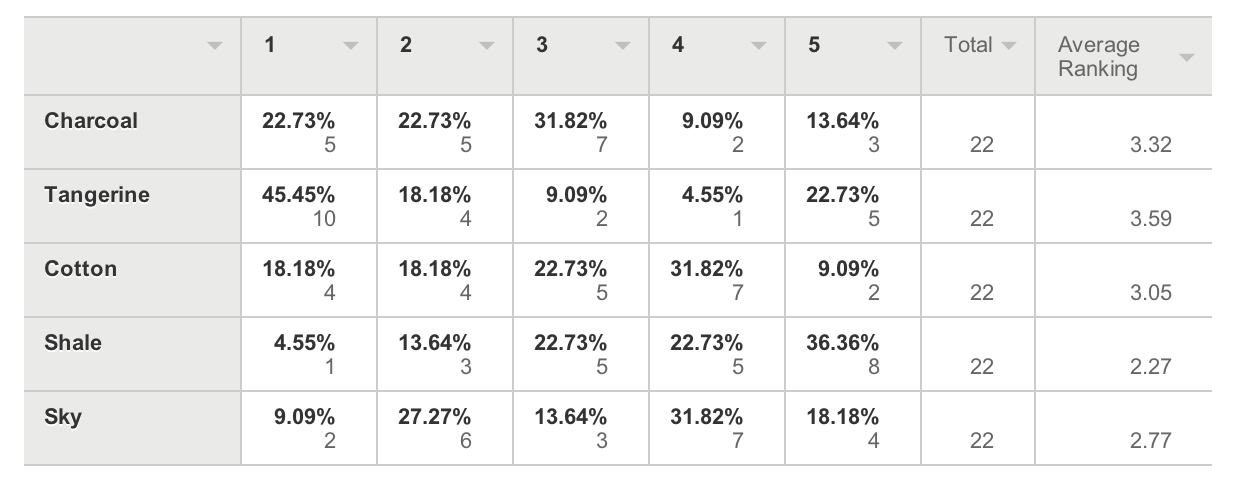
Tangerine wins by a landslide! I was going to go against the popular vote and get the white one, but both the white and black ones were out of stock at the time, so I went for the fan favorite. I ended up getting the Tangerine device the day after I ordered it (next day shipping FTW).
GlassFart
My intention with getting the Google Glass is to try it out and see if I can make anything really cool with the additional sensors and the fact that the device is worn on a person's head. I was really struggling with what to start working on, and then it hit me: a fart app. I was actually working on a Dragonball Z Scouter app, but that was going to be too complicated. I found that you can insert your own “Okay Glass” prompts to start an app, so I figured I'd make a hello world fart app.
The history of fart apps on advanced mobile operating systems is a long one, so I won't go over all that. Suffice it to say I am proud to have written the first (as far as I know) native fart app for Google Glass. Here's a video of me demonstrating it:
Having played around with the GDK a bit, and the device a bit more, I am still not sure if I will keep it. The $1500 price tag is one factor. The public acceptance of the device is another. My opinions on my previous Glass post still hold. If anything, the opportunity is definitely worth the $1500 “loan” to Google plus return shipping.
Contest
Before I even got my first Google Glass invite, I went to a GDG Android meeting in Ann Arbor. The organizer had some spare Glass invites, so I asked for one. I hadn't heard back about the invite, but after ordering my Glass from my original invites, I got another one from the GDG group's pool. I figured I'd give it away, and to drum up interest in the fart app, I'm going to make a tweet and ask users to retweet it for a chance to win.
To celebrate my Google Glass fart app, I'm running a contest to win a Glass invite! RT to enter, check http://t.co/vfT2UtsuSc for details.
— Hung Truong (@hungtruong) December 6, 2013
Here's some rules:
- Enter the contest by retweeting this tweet.
- You can only enter once per Twitter account.
- Don't make multiple Twitter accounts to enter or you'll be disqualified.
- The contest is for the invite code. You still have to buy the Glass yourself.
- The contest will end on Sunday, Dec 8th at 11:59PM ET.
- The contest winner will be chosen by random and will get a DM with the code (you should also follow me to make sure I can DM you).
- The invite code expires some time on Dec 10th, so you'll have a couple of days to order it.
- I'm not liable for anything. Like if you're mad about getting an invite and want to sue me or something.
- If no one enters I'll probably just tweet out the code and the first person to use it gets it!
Here are Google's rule for eligibility:
- be U.S. residents
- be 18 years or older
- purchase Glass
- provide a U.S. shipping address OR pick up their Glass at one of our locations in New York, San Francisco or Los Angeles