-
April 10, 2007
Craigslist and Google Maps Mashup Thingy: Day 5 – CakePHP

Today technically counts as day 5 of my Craigslist and Google Maps Mashup thing since I didn't work on it at all yesterday due to getting Command and Conquer 3: Kane Edition. I got the limited edition number 73137, which is cool since it's a palindrome!
Anyway, today I actually did work a little bit on the mashup. I spent most of my time switching out from a random php output file to a CakePHP setup. I haven't ever used CakePHP before, but I have used Ruby on Rails quite a bit. CakePHP is sort of like PHP's answer to rails. It copies a lot of the ideas and conventions that Ruby on Rails expects developers to follow.
Because of the similarities between CakePHP and Rails, I found it pretty simple to migrate the PHP I already had to CakePHP. I just had to learn the proper syntax to get everything working in Cake. I still think Ruby is a really beautifully simple language to write code in. Cake tries to get things looking Ruby-ish, but there's still some weirdness involved. It's good for me to be learning these PHP things anyway, though. I've put PHP on the backburner for too long.
Tomorrow, if I have time to work on the project, I think I'll implement the actual UI side of things. I have a rough idea of how I want users to be able to interact with the site. Hopefully designing the interface will be as easy as it is in Rails.
-
April 08, 2007
Craigslist and Google Maps Mashup Thingy: Day 4
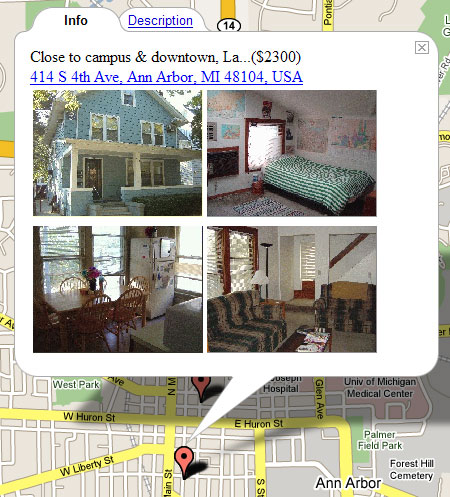
Today I made a bit more progress with my Craigslist Google Maps mashup thing. I setup the database table that handled the pictures for the listings, and added the images to the view as well. After that, I setup a new parser to parse the listings that can be found at the Michigan off-campus housing listings page. I'm not sure if I should make a separate page for these, or include them in the Craigslist listings…
I also came across a weird bug. When I ran the new Michigan parsing script by going to the page from a web browser, the thing would run fine, but after I uploaded to the server and ran it from the command line, it would flip out. It took me a really long time to figure out, but it turns out that I was calling a separate function by passing a value and not a reference.
I actually thought this might be a problem when writing the function, but when it worked, I forgot about the issue momentarily. The weird part is that the function works fine when you hit the .php file from a browser, and not when you run it from the command line. It must be some setting in the environment…
Besides that minor problem, everything seems to be going along smoothly. PHP has a lot of nice built in functionality for doing string manipulation, which this project has a lot of. It's also got really nice networking and file reading capability. I guess that makes sense, since it originally came about as a tool for creating websites.
Tomorrow I'll try to get the mashup site setup with actual options and navigation. Right now it's just set on Ann Arbor. I'll have to do some routing to get the many different options that people might want set up.
-
April 08, 2007
Craigslist and Google Maps Mashup Thingy: Day 3
Yesterday I worked on the mashup thing, but then I got sleepy and didn't write a post about it. So here's a post!
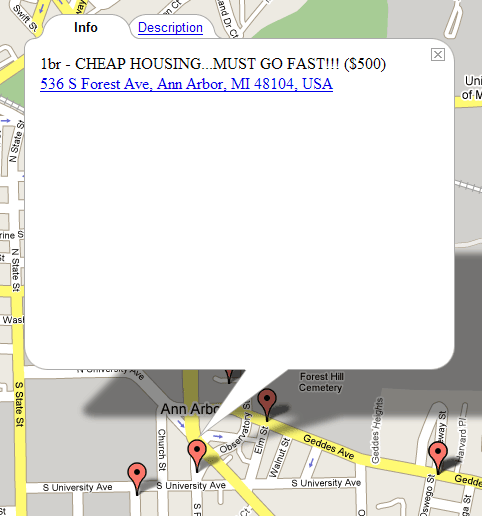
Basically I worked on adding the individual listings onto the Google Map with stuff like the description, address, and price. At first I thought about importing the points from some kind of xml document, but I figured the approach with just embedding it was easier.
Then I figured out how to start scraping some of the listing info from the Michigan off campus housing site. This site seems to have better listings in terms of quality and price. I think today I'll work on getting all of that info into the database so I can map it as well.
-
April 06, 2007
Craigslist and Google Maps Mashup Thingy: Day 2
Today I pretty much worked on my Craigslist Google Maps app all day. I spent a lot more time getting the data that I scraped from the individual Craigslist ads into the database, and then setting up the cron script thing to periodically pick up the new feeds. To parse the RSS feeds, I just used Magpie since it was really easy.
Magpie wouldn't parse the KML files that Google Maps uses to do its geocoding thing (where it gives you the latitude and longitude based on an address) so I had to use a regular expression. It was a pretty ugly hack, but at least it got the job done. I suppose it's more efficient to use regular expressions rather than a full blown parser though. Maybe.
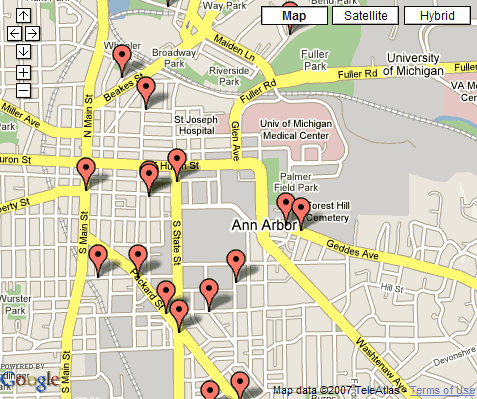
I also got the database info for the apartment ads into Google Maps using their API. It's actually pretty simple once you understand what all the lines mean. I'm sort of weak in Javascript, so I guess this is a good chance for me to learn some more. I know Java, but I'm not used to using things like event listeners for mouse clicks and stuff like that. GUI? Who needs 'em, right?
So I've got a sort of working prototype. Now all I need to do is clean it up and add more prettiness and features. Right now when you click on the map marker, you just get the description. Hopefully I can add stuff like the price, a link to the Craigslist listing, and pictures. It shouldn't take too long, now that I've got the skeleton in place.
-
April 05, 2007
Craigslist and Google Maps Mashup Thingy: Day 1
So I'm sort of looking for housing in Michigan since I'm gonna be living there for two years. The apartments apparently go fast, so I should be looking for them a few months ago. Which is to say now.
A while back, some guy made a mashup of Craigslist and Google Maps. HousingMaps shows a giant google map with pushpins corresponding to communities on Craigslist. I think this was one or two years ago. Since then, other communities have been added to Craigslist, but the person who wrote this site hasn't updated anything. Guess what? Ann Arbor isn't one of the communities supported by HousingMaps.
So I figured it'd be a good exercise in coding (in PHP and some javascript for the Google Maps component) for me to do something similar. Sure, I'm not doing anything very original, but at least I'll learn something, and I think it'll be difficult enough without being impossible.
So far, I've gotten the important chunks of info parsed out of the individual Craigslist listings. Note to Craigslist: Your HTML is horrendous. It is formed: horribly. Okay, so maybe it's not that bad, but it's certainly not semantic. Honestly, figuring out how to parse this very crappily formed HTML took some crazy logic, but I think it came out okay in the end.
Next, I'm going to have to figure out putting these listings into the database (shouldn't be that hard), so that they can populate the map. After that, adding stuff to the map and getting the map to do what I want. Now, sleep.