Vibe Coding a New Voice Cloning Audio Article Generator With OmniVoice

I was listening to the generated audio for my blog post that I wrote yesterday about running local AI agents, and some of the sentences were kind of annoyingly spoken. I don't want people to get the wrong idea about me (that I speak weird), so I thought I would do some work on improving the way that I generate audio for my blog posts.
I've had some ideas in my head about ways to improve the workflow for making these audio files, so I went ahead and vibe coded a graphical CLI tool (since those are really cool right now) to do it. I also switched from using Qwen TTS to a model called OmniVoice after testing it locally on my Mac Studio.
Goodbye Qwen3-TTS, Hello OmniVoice
One of the main pain points with my original audio article generator was that I was running it on Kaggle. I tried running it locally but it was pretty slow and I didn't want to wait for the audio to finish before publishing my blog. And for some reason the quality using MLX wasn't as good as when I used the Nvidia chips on Kaggle.
I was browsing HuggingFace looking for new models and I saw one called OmniVoice that was trending in the TTS section. It looks like it was released at the beginning of this month. I did a quick test of its voice cloning capabilities and it sounded just as good as Qwen3-TTS, maybe even better since it was more consistent. It also ran much faster locally, pretty close to real time, I'd say.
CLIs Are So Hot Right Now
I decided to make local audio generation part of my blog writing workflow, so I had Gemini write me a CLI tool that would pick up the sentences from my blog post, generate each one, and let me preview them before approving or requesting a re-do. The most annoying thing about the previous workflow is that it would just run the whole thing and spit out a giant audio file and subtitle file. If a sentence sounded weird, I would have to re-run the entire flow and just pray that it sounded better. With this method, I can request regeneration on a per-sentence basis, and even edit the prompt that I send to TTS to fine-tune it if I want.
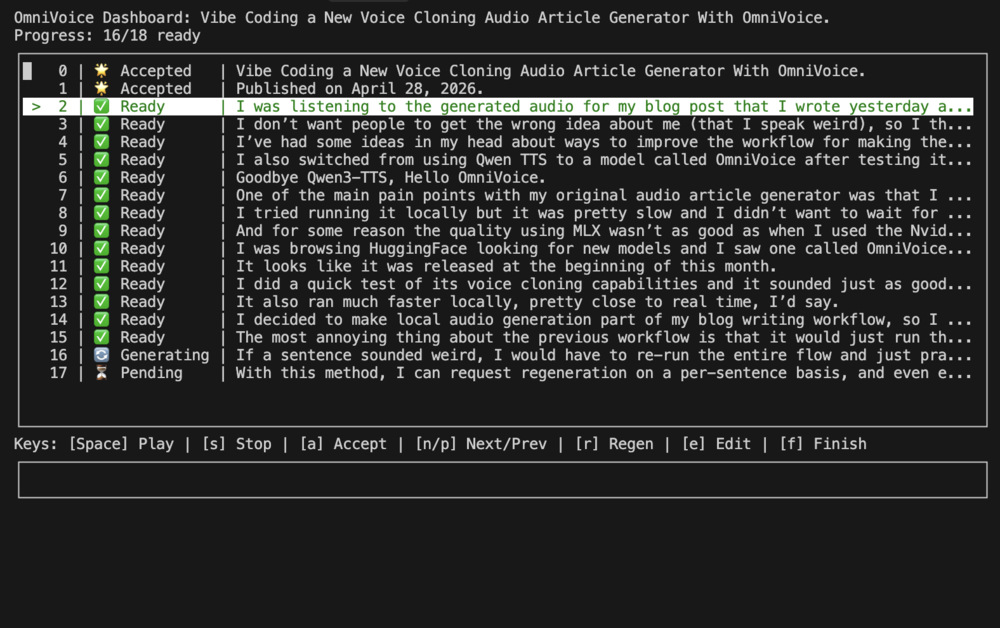
Another cool thing about the CLI tool is that I can actually run it as I write the blog post, so I hardly need to wait for the audio to complete before publishing. If I edit the post later on, then I'll have to regenerate some sentences, but that isn't the end of the world. I think the CLI tool is smart enough to keep sentences that haven't changed and only regenerate the edited ones, but I haven't actually tested it yet. And in terms of reviewing the sentences, I could probably listen to each one, or YOLO it if I don't really care (but I do care).
This is probably even more overkill for a feature that literally no one ever asked for. But in a world where software costs literally nothing, it's still pretty fun to just get it working the way I'd like. In the past, I would've had to spend a ton of effort to figure out how the CLI tools worked, getting them to play nicely with the Python backend, and figuring out how to get the inference to work on my Mac. I literally got this working this morning before lunch time, so it wasn't a huge deal at all.
I'm looking forward to adding even more over the top features to my personal blog that no one even reads. Maybe a hologram version of myself reading the blog post to you would be cool...


Leave a Comment
Comments are moderated and won't appear immediately after submission.